
Recommended Specifications for Medisoft – System Requirements

Read the system requirements for Medisoft software. Medisoft can be server-based (on-premise) or cloud-based; if choosing a server-based setup, purchasing the hardware recommended by Microwize will prevent slowness, crashing, and freezing issues. Need help? Contact us.
Medisoft Cloud or Medisoft Clinical Cloud
The Medisoft Cloud client application can be installed on devices running on the following operating system versions: Windows 10 or higher (Professional recommended); macOS 10.15 (Catalina) or higher; Chrome OS; iOS/iPadOS 14 or higher; or Android 10 or higher.
High speed Internet access (2Mbps upload per computer)
Managed firewall (highly recommended)
Static public IP address, or one office computer per location designated for a public dynamic IP address resolver (DDNS)
Internal computer and network speed of 1Gbps
TWAIN-compatible scanner for scanning into the application (for example, ScanSnap is not TWAIN-compatible and therefore is not supported)
Desktop/Laptop minimum specs:
Desktop – 1 Intel Core 2 Duo Dual Core, 8GB RAM, 320GB HDD, 1 gigabit Ethernet
Laptop – 1 Intel Core i5 Dual Core, 8GB RAM, 320GB HDD, 1 gigabit Ethernet and/or wireless 802.11 b/g/n
Medisoft Workstation

- Intel processor equivalent to Core i3 2.6 GHz or higher (AMD not supported)
- 8 GB RAM
- 20 GB of available hard disk space
- DVD-ROM drive optional; physical media available for an additional fee
Workstation Operating System
- Windows 10 Professional (with Medisoft v20 hotfix 1 and higher versions); Windows 11 with Medisoft v26 and higher only
- Home Editions are not supported
Network
- Full-duplex Ethernet: Gigabit/s card/switch/cabling (for Network Professional and Clinical, computers must be on the same network as, and able to access shared directories on, the database server)
- Wireless networks are not recommended or supported in a client/server configuration and will lead to data corruption. Wireless network access is supported if the client computer is using a third-party application for access (Terminal Services, Citrix, Parallels/2X, etc.). Wireless servers are not supported.
Internet
- High-speed cable or DSL (dial-up not supported)
Scanning into Medisoft
- You can now scan insurance cards and other documents directly into Medisoft. This feature requires a TWAIN-compatible scanner. For reference, the following scanners were used in successful testing of the scanning feature (this is not an exclusive list and other TWAIN-compatible scanners may also work): Ambir DS490, DS687, PS600, and PS667
Brother MFC 8680DN
Canon PIXMA MX452
CSSN ScanShell 800DX, 800DXN, 800N, 800R, 800NR, 1000N, 1000A, 1000NA, and 2000N
Fujitsu 6130z
Twisted Technologies TTScanner - If you are working with Terminal Services / RDP / Medisoft Cloud, you will need additional software to connect a scanner to Medisoft, such as TSscan.
- Microwize recommends that you use a dedicated insurance card scanner for scanning insurance cards.
- As scanning images into your Medisoft database will increase its size and possibly affect the performance of the software, use the lowest acceptable resolution and size for your scanned images.
Medisoft Patient Accounting Server Hardware
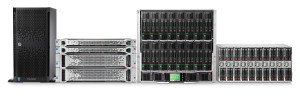
Server Hardware for 5 – 10 Workstations
- Intel processor equivalent to Xeon Quad Core 2.4 GHz or higher (AMD not supported)
- 16 GB RAM
- 32 GB+ available on system drive
- 1 TB+ (one terabyte or more) data drive
- RAID hard disk configuration
- DVD-ROM drive optional; physical media available for an additional fee
- Tested backup system (“bare metal” backups) required
- UPS required
- Only one NIC (Network Interface Card) can be enabled on the server
- These requirements are indicated for an office with 5 to 10 workstations
Server Operating System
MS Small Business Server is not supported
- Windows Server 2016/2019 (Essentials, Standard, or Datacenter only; 2019 for Medisoft v24 and higher only; Foundation not supported; Server 2012/2012 R2 will reach end-of-support in October 2023 and should not be used for new installs)
1 to 5 Workstations
- Windows Server 2016/2019 (Essentials, Standard, or Datacenter only; 2019 for Medisoft v24 and higher only; Foundation not supported; Server 2012/2012 R2 will reach end-of-support in October 2023 and should not be used for new installs)
- Windows 10 Professional (with Medisoft v20 hotfix 1 and higher versions); Windows 11 with Medisoft v26 and higher only
- Home Editions are not supported
Other Requirements
- Separate data and OS partitions recommended
- Advantage v11.10 database (older versions must be upgraded)
- Thin client technology (Terminal Services/Parallels/2X/Citrix) is required for wireless
- Antivirus must be installed; your antivirus must also be capable of being configured to exclude various eMDs folders. Speak to your technology consultant about the antivirus solution we highly recommend.
Medisoft Clinical (Full Suite) Hardware
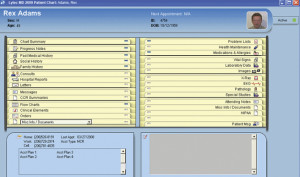
Recommended Specifications for Medisoft Clinical (EMR)
Workstation Hardware
- Intel processor equivalent to Core i3 2.6 GHz or higher (AMD not supported)
- 8 GB RAM
- 20 GB of available hard disk space
- DVD-ROM drive optional; physical media available for an additional fee
Workstation Operating System
- Windows 10 Professional (with Medisoft v20 hotfix 1 and higher versions); Windows 11 with Medisoft v26 and higher only
- EKG and Spirometry devices are not supported on 64-bit OS
- Home Editions are not supported
Network
- Full-duplex Ethernet: Gigabit/s card/switch/cabling (for Network Professional and Clinical, computers must be on the same network as, and able to access shared directories on, the database server)
- Wireless networks are not recommended or supported in a client/server configuration and will lead to data corruption. Wireless network access is supported if the client computer is using a third-party application for access (Terminal Services, Citrix, Parallels/2X, etc.). Wireless servers are not supported.
Internet
- High-speed cable or DSL (dial-up not supported)
Server Hardware for 5 – 10 Workstations
- Intel processor equivalent to Xeon Quad Core 2.4 GHz or higher (AMD not supported)
- 16 GB RAM
- 100 GB+ available on system drive
- 1 TB+ (one terabyte or more) data drive
- RAID hard disk configuration
- DVD-ROM drive optional; physical media available for an additional fee
- Tested backup system (“bare metal” backups) required
- UPS required
- Only one NIC (Network Interface Card) can be enabled on the server
- These requirements are indicated for an office with 5 to 10 workstations
Server Operating System
MS Small Business Server is not supported
- Windows Server 2016/2019 (Essentials, Standard, or Datacenter only; 2019 for Medisoft v24 and higher only; Foundation not supported; Server 2012/2012 R2 will reach end-of-support in October 2023 and should not be used for new installs)
Other System Requirements
- Data and OS partitions must be separate
- Data partition must be a logical drive designated as P:
- Thin client technology (Terminal Services/2X/Citrix) is required for wireless
- TWAIN scanner required for Zoom
- Domain/Active Directory infrastructure is required
- Antivirus must be installed; your antivirus must also be capable of being configured to exclude various eMDs folders. Speak to your technology consultant about the antivirus solution we highly recommend.
Medisoft on macOS
Ever wish you could run Medisoft on your Mac?
Well, now you can!
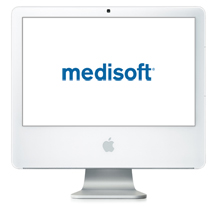
Medisoft Cloud allows you to run Medisoft on your iMac, MacBook, Mac Pro, or Apple iPad! Medisoft cloud starts at $49/month per user. To find out more about using Medisoft on macOS, check out Medisoft Cloud pricing.

Printers
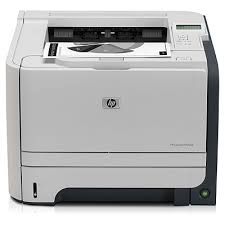
Printer Recommendation for both Medisoft and Medisoft Clinical EMR:
- HP LaserJet 1300 or higher; Microwize will not support any other printer
Scanners
Depending on whether your Medisoft is server-based or cloud-based, you need to get the most efficient scanner to avoid problems.
Medisoft Card Scanner
Card scanner/document Scanner, Optimized for superior scanner performance and reliability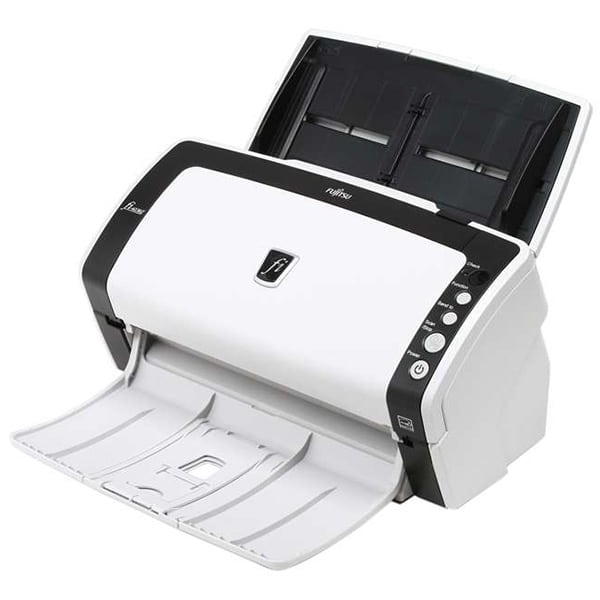
- Fast, 40ppm / 80ipm scanning in monochrome and grayscale
- Exceptional 300 dpi color scanning at 30ppm / 60ipm
- Advanced paper handling technology for the ultimate in feeding reliability
- Robust 50-page Automatic Document Feeder (ADF) with enhanced hard embossed card scanning
- TWAIN
Ambir Simplex ID Card Scanner (PS667ix-AS) Simplex ID Card Scanner with AmbirScan
 Efficient card and ID scanning. The ImageScan Pro 667ix is a rugged simplex card scanner. Because it’s USB-powered, you’ll never need to search for an outlet. And at just under one pound and about 8” long, it fits on any crowded desk, registration area or mobile cart.
- Complete Solution. The included AmbirScan Lite capture software is not only easy to use, it’s productive too! Save your scanned documents as PDF, TIF or JPG and automatically save them to any folder on your computer or popular cloud services including: Box, DropBox, Evernote and Google Drive.
- Handles cards of all kinds. Patient IDs. Insurance cards. Driver’s licenses. New business leads. The ImageScan Pro 667ix handles them with ease. Professional-grade hardware and advanced image processing captures clear images of everything in seconds – even cards with raised characters.
- Easy to maintain. All ImageScan Pro 667ix scanners are factory calibrated and require no calibration when installed to insure excellent image quality right out of the box.
- Compatible. The ImageScan Pro 667ix TWAIN driver ensures compatibility with thousands of healthcare and other applications that support TWAIN scanning. Citrix Ready insures no hassle installation and use in Citrix environments.
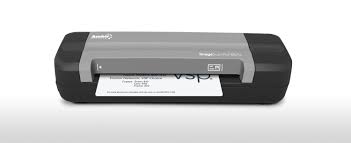 Efficient card and ID scanning. The ImageScan Pro 667ix is a rugged simplex card scanner. Because it’s USB-powered, you’ll never need to search for an outlet. And at just under one pound and about 8” long, it fits on any crowded desk, registration area or mobile cart.
Other Requirements
Important Notes for both Medisoft and Medisoft Clinical EMR:
-
- If you decide to run additional services (DNS, Active Directory, Terminal Services, iTunes, etc.), you will need additional processing power and memory
- Storage requirements can only be used as a guideline. Please contact your Technology Consultant for a personalized storage recommendation
- Hardware-level firewall is recommended
- Dragon Medical must be installed locally. Some integration is not available via thin client
Please contact your Technology Consultant if additional assistance is needed to determine system compatibility.
Never let your hardware slow down your software.
Tired of incompatible hardware? Try HaaS (Hardware as a Service) for as little as $69/month and get your hardware managed and replaced at no additional charges. To learn more about this plan, click on this link: HaaS
Need more info?
Call us at 800-955-0321
Call 800-955-0321 or Click below
Download a Demo
Free trial software and online demos
Try a Free Demo
Schedule Live Demo
Let our experts show you our solutions