
MediNotes EMR/EHR Software


MediNotes IS THE EMR SOFTWARE VALUE LEADER

MediNotes e Electronic Charting EMR Software

MediNotes e Features

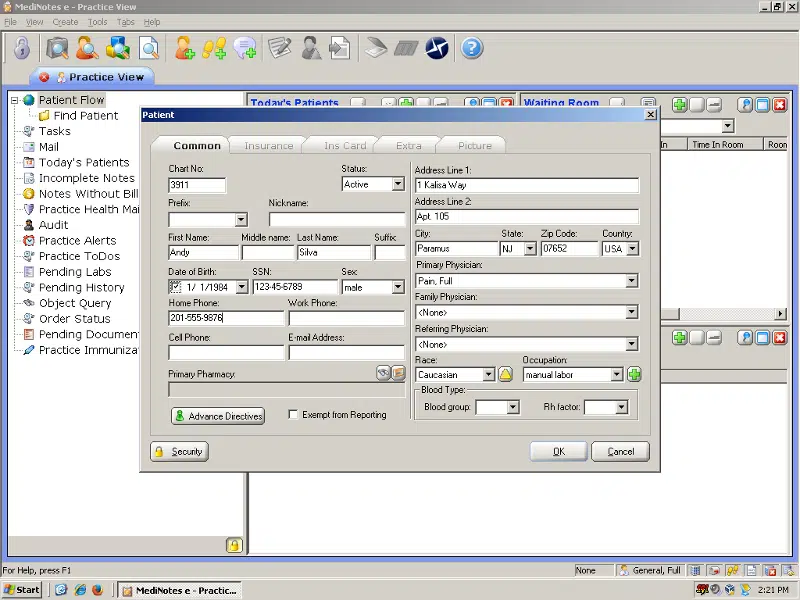
Electronic Patient Folder

You'll never have to hunt for a patient's folder again. The entire patient history, copies of every document and more are all completely accessible from the electronic patient folder.CCHIT

  • Allergies
  • Past Medical History
  • Treatments/Diagnoses
  • Multimedia links to images, etc.
  • Alerts for the patient
  • Remarks about the patient
  • Patient Overview and Patient Summary


Default-based WYSIWYG Templates

MediNotes e™ templates are color-coded to reflect the current status of the text.

Black Text - This is simply text which has been hard-coded into the template.MediNotes screen
Blue Text - This is a default value for a pop-up window.
Red Text - This is an optional pop-up window that can be clicked if needed.
Green Text - This signifies that the user has activated the dialog and made a change.

MediNotes e™ templates also, in many cases, contain predefined values. "Default phrases" provide the text for a "normal" note. This reduces the time necessary to create a note because the majority of a "routine" case is already charted.

Our notes reflect a "What you see is what you get" philosophy. All of the exam charting is done from one screen. There is no need to switch between screen to enter each section of information. The note is laid out as you write it.

New Note from an Old Note

Routine charting or documentation for follow-ups are a breeze with the New Note from an Old Note command. Simple choose a patient's past note to use as the basis for the new visit. Typically these notes are very similar to the previous visit - so very little extra work is necessary to complete the documentation for the new visit.

ESP (Electronic Statistical Planning)

MediNotes e™ can analyze all of the treatments for a certain diagnosis and rank order them for you when you are writing a note. This ranking makes the common treatments easier to find and improves the speed of your charting.

Common/Topic/All History Elements

MediNotes e™ revolutionizes documentation with a simple and effective way of handling your medical content. Each history dialog contains a tab for Common, Topic, and All.

Common - This tab is user-definable. For Allergies, you are able to show only the allergies that you use frequently to make your list more manageable.
Topic - The Topic tab is simply a categorized tree diagram that allows you to pick your specific history items from the category headings.
All- Type in the first few letters of the item that you're looking for, and the "All" tab will search the database for the history item that matches your description.

MediNotes e™ includes History dialogs for: Medical History, Social History, Medications, Allergies, Family History, Surgical History. Appropriate disciplines will also include: Immunizations, Growth Charts, OB History, Menses History, and Genetics History.

Integrated Office Tasks

MediNotes e™ can improve the flow and efficiency of your office by creating additional documentation based on the information in your note.

Physician Referral Letters
In only 4 mouse-clicks you can create a professional letter to refer a patient, or thank another physician for their kind referral. The letter includes either the full patient note, or just the impression and plan sections for their reference.
Patient Instructions
Customized Patient Instructions can be printed and sent home with the patient regarding their care.
Patient Letters
Similar to a referral letter, the patient letter is simply a letter template that can be printed and sent to your client.
Physicians Orders
When an order has been documented in the note, a worksheet can be printed to show what the physician has ordered.
Prescriptions
Create a script right from the program using the extensive medical library. The information for the script is also included at the bottom of the patient's note, and in the patient's medications folder for easy and consistent reference.
Superbill Statements
The Billing Wizard pulls the billing codes from the dialogs used in the exam documentation. Simply associate the Diagnoses with the appropriate Treatments, and print the Superbill Statement. (Some of the billing interfaces allow a direct transfer of this information to their program - see Import section.)

Flexibility

The most important distinction for MediNotes e™ is theMediNotes Logo flexibility. It is, by far, the most flexible and user-definable program on the market today. Our templates are composed of customized dialog boxes that each have a different set of characteristics. Some are simple text macros, while others have dynamic slider bars for quickly entering numerical values or anatomical graphics for describing the location of the condition.

Immunization History

The Immunization History dialog is used in General Medicine to complete a immunization record for the patient. This includes childhood immunizations and travel boosters.

Graphic Annotator

The Graphic Annotator allows the physician to write or draw on the MediNotes e™ graphics and then store them in the patient's multimedia folder for future reference.

E & M Wizard

The E & M Wizard makes short work out of the tedious challenge of E & M coding.  Exam elements in MediNotes e™ have been specially "tagged" so the program can easily count the number of E & M bullets that have been documented, and then list the appropriate codes for the visit.

HotSpot Editor

MediNotes e™ utilizes many full-color graphics to quickly describe an anatomical location. The HotSpot Editor allows the user to define and modify these areas, and the text descriptions. With this tool, existing graphics can be modified by the user, or new images can be added to the program.

History Repopulation

Information that has been added to the patient's history (from a note, or by adding the information directly to the patient's folder), can be pulled into the history section of a note.

History and Physical - Information available in the patient's history will automatically be repopulated.
SOAP - History information can be added to a SOAP note by simply pressing the HX button in the toolbar.

Office Text Messaging - NEW

MediNotes e now offers a secure way for medical personnel to discuss confidential patient information or offer reminders regarding patient care. MediNotes Messenger is a text-based communication system that is stored and distributed through the program database. Since it is contained within the secure program, only the recipient (MediNotes e user) is able to access the message.

Daily Patient List

The daily patient list can pull the scheduled appointments into a manageable list for quick access by the physician. The patient list can be updated manually by office staff, or can automatically pull in scheduled patients from your current schedule in programs such as Medisoft or Lytec, as well as Appointments Pro and AppointWare electronic scheduling programs.

Additional Interfaces

MediNotes e 5.0 now offers several new interfaces with Patient Accounting packages (click here for a full list), as well as, HL7 and XML exporting capabilities.

Accepts Voice Recognition
Many of the new voice dictation software packages can dictate into MediNotes e™. This is true with the popular Dragon NaturallySpeaking™ and IBM ViaVoice programs. These programs can be purchased separately from MediNotes e™ through national or local retail electronic chains.

Other programs that have the ability to dictate into other windows can be utilized with MediNotes e™ directly as well. Programs without this ability can also be used, but would require the user to cut and paste information.

Note - When looking at voice systems to use in conjunction with MediNotes e™, realize that the minimum hardware requirements for these programs are usually higher than those for running MediNotes e™.

Discipline Specific Features

Growth Charts (Primary Care)

growth chartA growth chart can be completed for pediatric patients based on the age, height, weight, and head circumference. This feature creates a dynamic line graph representing the charted values over the lifetime of the patient.

Prenatal Explorer (Primary Care/OB-GYN)

Several dialogs have been bundled together in what is referred to as the Prenatal Explorer. This feature of the program includes:

  • Estimated Due Date Calculator
  • Prenatal Visit Dialog
    • Fetal movement, position, and heart rate
    • Prenatal lab values
    • Mother's weight, blood pressure, and height

Contraception History (Primary Care/OB-GYN)

The Contraception History dialog is used to keep a historical description of contraceptive methods used by the patient. Includes detailed lists of barrier types, and oral contraceptives.

Genetics (Primary Care/OB-GYN)

If your patient has a known genetic disorder, this can be documented using this dialog.

Obstetric History (Primary Care/OB-GYN)

The Obstetrical History dialog allows a physician to track all of the past pregnancies for a patient. This dialog includes:

  • Birth weight
  • Length of Labor
  • Duration of Pregnancy
  • Complications
  • Delivery Method
  • Gender

Click here to download your FREE demo today!

Contact our consultants to get more information Call 800-955-0321 or click here


MediNotes SUPPORT


MediNotes AWARD WINNER

Microwize has been named
MediNotes CHAIRMAN'S CLUB WINNER
When you deal with Microwize, you know you're working with the best!

 
2007 Microwize Technology, Inc. All rights reserved