
MediNotes EMR/EHR Software


MediNotes IS THE EMR SOFTWARE VALUE LEADER

MediNotes e Electronic Charting EMR Software

We have gone to great effort and enlisted an outside HIPAA expert to determine the steps necessary to comply with the HIPAA regulations that are applicable to electronic medical records. We are very proud to announce that our 2005 release of MediNotes e (Version 5.0) has been certified for HIPAA. In many cases, security and database functionality existed and only had to be enhanced for HIPAA regulations. In other instances new functionality had to be created to meet the security and confidentiality required by HIPAA.

MediNotes e Version 5.0
As stated in the last newsletter, Version 5.0 turned out to be much more than was originally anticipated. With an addition in our development staff and an expanded timeline, we were able to add enhancements from many of the wish lists that have been submitted by our users.

HIPAA Certified

MediNotes e has been audited for compliance to the HIPAA regulations that apply to electronic medical records and we have been certified for HIPAA Compliance.

  • Enhanced password security
  • Automatic system logout due to inactivity
  • Enhanced audit trails
  • Enhanced Note Addendum with auto-strike through
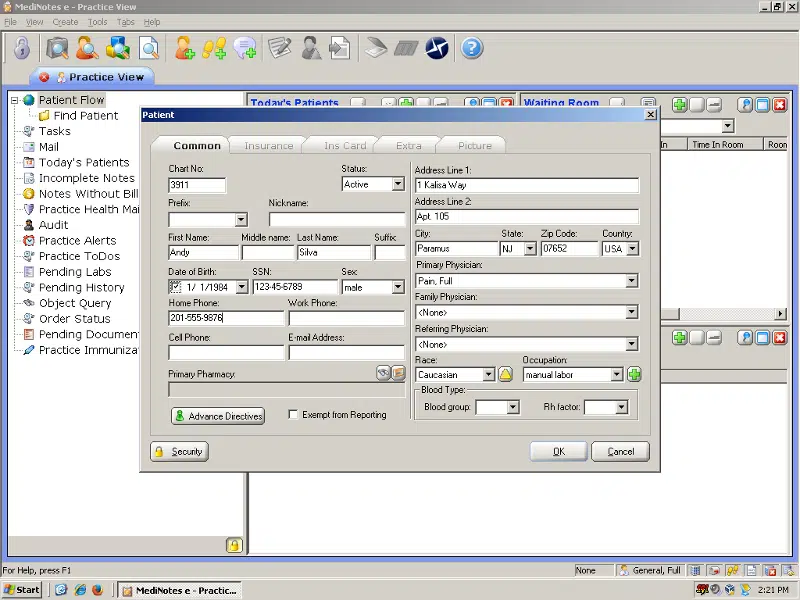
  • ability to store and display a patient's picture in their electronic patient folder
  • preventive Medicine

Rule-based system for scheduling and tracking Preventive maintenance visits i.e. Osteoporosis screening for every 2 years for women over the age of 65

  • Custom HPI elements tied to specific Chief Complaints - with E&M support
  • Pull Forward/Repopulate Information
    • Traditionally - history information can be repopulated into a new note
    • MediNotes e adds the ability to pull "object" information from a previous note (the object must have been used in the previous note)
    • MediNotes e also adds the ability to pull information added on the front screen (using the Patient Monitor) into the note
  • Patient picture
  • Enhanced Listbox
    • Add new choice or temporary choice on the fly
    • Improved flow layout in the Object Editor
  • Multiple prescriptions on a single page
  • Ability to make certain elements "required" in a template
  • Enhancement to "Lesion" and "Ulcer" dialogs to improve entry of size measurements
  • Added functionality for "To-do's" - allows listing in the Practice Desktop

MediNotes e Add-On Modules
The following modules will be available for sale with the release of MediNotes e 5.0. Please contact your Microwize for pricing specific price quote on the modules you would like to purchase for your practice. These modules are sold a la carte so you can purchase just the right accessories for your needs.

Patient Monitorscreen
This new add-on is a must-have for serious MediNotes e users. It allows you to customize the patient folder with multiple panels based on any object in the program. Shown at the left is an example of a pane showing Chief Complaint, Patient Picture, Diagnoses, Treatments, Labs, Immunizations and Medications.

You can easily show other information based on any object in a template - Vital Signs, Inspection of Skin, Range of Motion, Eye Exams and more.

Practice Desktop
The main screen of MediNotes e is primarily 'patient-centric'. The screen has been designed to organize and display all of the patient's medical information. The Practice Desktop program is the other side of the coin - information strictly for providers. This screen uses the same customizable panel layout as the Patient Monitor, so you can display as much or as little as you'd like - in the arrangement that you prefer.

  • To-do's
  • Alerts
  • Preventive Medicine
  • Incomplete Notes
  • Notes without Bills
  • Today's Patients
  • Messages from the MediNotes Messenger

Security Module
Designed primarily for medium to large office settings, the MediNotes e Security Module allows the system administrator to set activity levels for users on the system for individuals and groups. Using this utility licenses can be restricted only (i.e. staff licenses can not be granted activities that they normally wouldn't have access to because of their license, but certain physicians could be restricted for certainsecurity activities in the system.

Security module can restrict the use of:

  • Adding New Objects
  • Using the Object Explorer
  • Moving Objects
  • Using the Purge Wizard (enable it so only the Admin can delete patients from the system)
  • Create prescriptions
  • Finish and Save Notes
  • View Notes
  • View Treatment
  • View Diagnosis

The Security Module can also block entire patients from view by unauthorized users. (i.e. for celebrity or otherwise well-known patients).

Practice Panorama
This Data Mining tool still continues to amaze people. With it you can quickly write a custom filter and gaze into your entire patient base. Not only does this allow you to query on clinical information, but it can be used to extract certain patients (i.e. allpanorama female patients over the age of 65 with diabetes) and mail merge their demographics in Microsoft Word to send a letter about a diabetes walk that your practice is sponsoring.

Filtered information can be exported to Word, Excel, Access and Crystal Reports for further manipulation.

Document Management
We realize that one of the big challenges that our users have faced is trying to be completely paperless in a paper-base world. With our 5.0 release we will have 2 separate ways to handle paper records in MediNotes e.

MediNotes e Document Management - This method is a very affordable way to improve the handling of single sheet scanned materials in MediNotes e. This module includes a TWAIN interface, which means that you will be able to "acquire" scanned documents and digital images directly from MediNotes e (assuming your equipment supports TWAIN). You will also have the option of storing the scanned material in the MediNotes e database or link it to the database in the traditional manner. The new system also includes the ability to add new custom organizational folders to the Multimedia directory.

AIC Document Management - Through a partnership and joint marketing venture, MediNotes is please to offer a high-speed, multi-page document management system through Advanced Imaging Concepts. AIC's system uses an ISIS interface to acquire documents at high speed and store them in a document management database. This database is easily accessible through the MediNotes e patient screen.

Contact our consultants to get more information Call 800-955-0321 or click here


MediNotes SUPPORT


MediNotes AWARD WINNER

Microwize has been named
MediNotes CHAIRMAN'S CLUB WINNER
When you deal with Microwize, you know you're working with the best!

 
2007 Microwize Technology, Inc. All rights reserved
 
tag --> tag -->